Torn Paper Masculine Collage
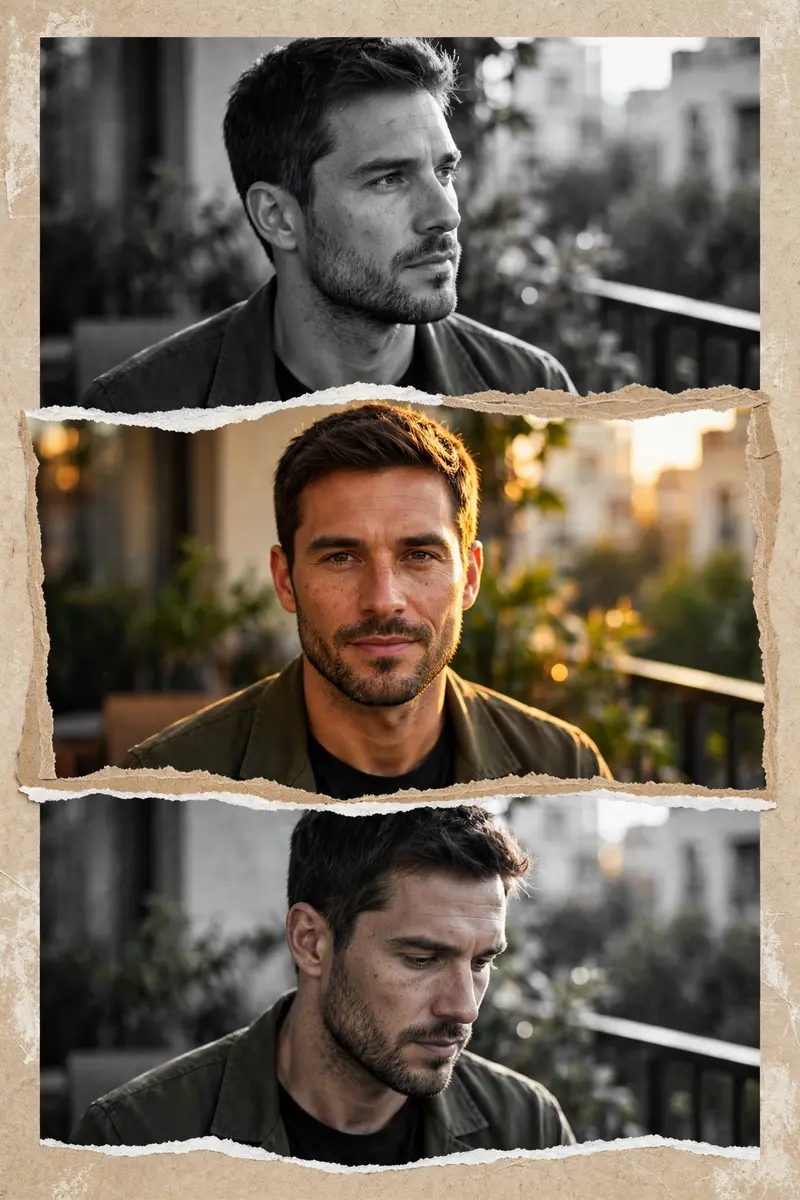
Best Torn Paper Masculine Collage AI Prompt
Copy the ready-made prompt below and paste it into ChatGPT, Gemini, or your favorite AI image generator to create a stunning photoreal portraits style image in seconds. No sign-up needed — just copy, paste, and generate.
✦ AI PROMPT
Create a stylish masculine collage portrait using the uploaded photo. Split the image into 3 horizontal torn-paper sections stacked vertically. The middle section should be in full color, showing a confident expression with natural golden-hour sunlight illuminating the face. The top and bottom sections should be in black & white, featuring slightly different angles or subtle expressions from the same photo for a cinematic storytelling effect. Add highly realistic torn-paper edges between each section with natural paper texture. Keep the background softly blurred with an outdoor urban, balcony, or greenery setting to create depth while maintaining focus on the subject. Enhance the lighting with warm golden-hour tones for a premium cinematic Instagram aesthetic. Maintain the exact facial identity, natural skin tone, sharp facial features, and realistic skin texture. Add subtle contrast, soft shadows, and depth to create a high-end editorial look. Apply clean color grading with rich blacks, crisp highlights, and balanced warm tones. Style: modern masculine aesthetic, cinematic, premium, luxury Instagram reel/post style, ultra-realistic, DSLR quality, 85mm portrait lens, shallow depth of field, soft natural bokeh, high-detail, 8K.
How to Use This Prompt with ChatGPT & Gemini
Click the Copy button above, then open ChatGPT (with image generation) or Gemini. Paste the prompt, hit generate, and wait a few seconds. You can tweak any detail — colors, lighting, mood — to make it your own.
How to Keep Your Face Unchanged
Want your own face in this style? First generate the base image with the prompt above, then use a face-swap tool like InsightFace or the Remini app to place your face onto the result.