Three-Layer Webcam Collage Prompt
Best Three-Layer Webcam Collage Prompt AI Prompt
Copy the ready-made prompt below and paste it into ChatGPT, Gemini, or your favorite AI image generator to create a stunning photoreal portraits style image in seconds. No sign-up needed — just copy, paste, and generate.
⋈ AI PROMPT
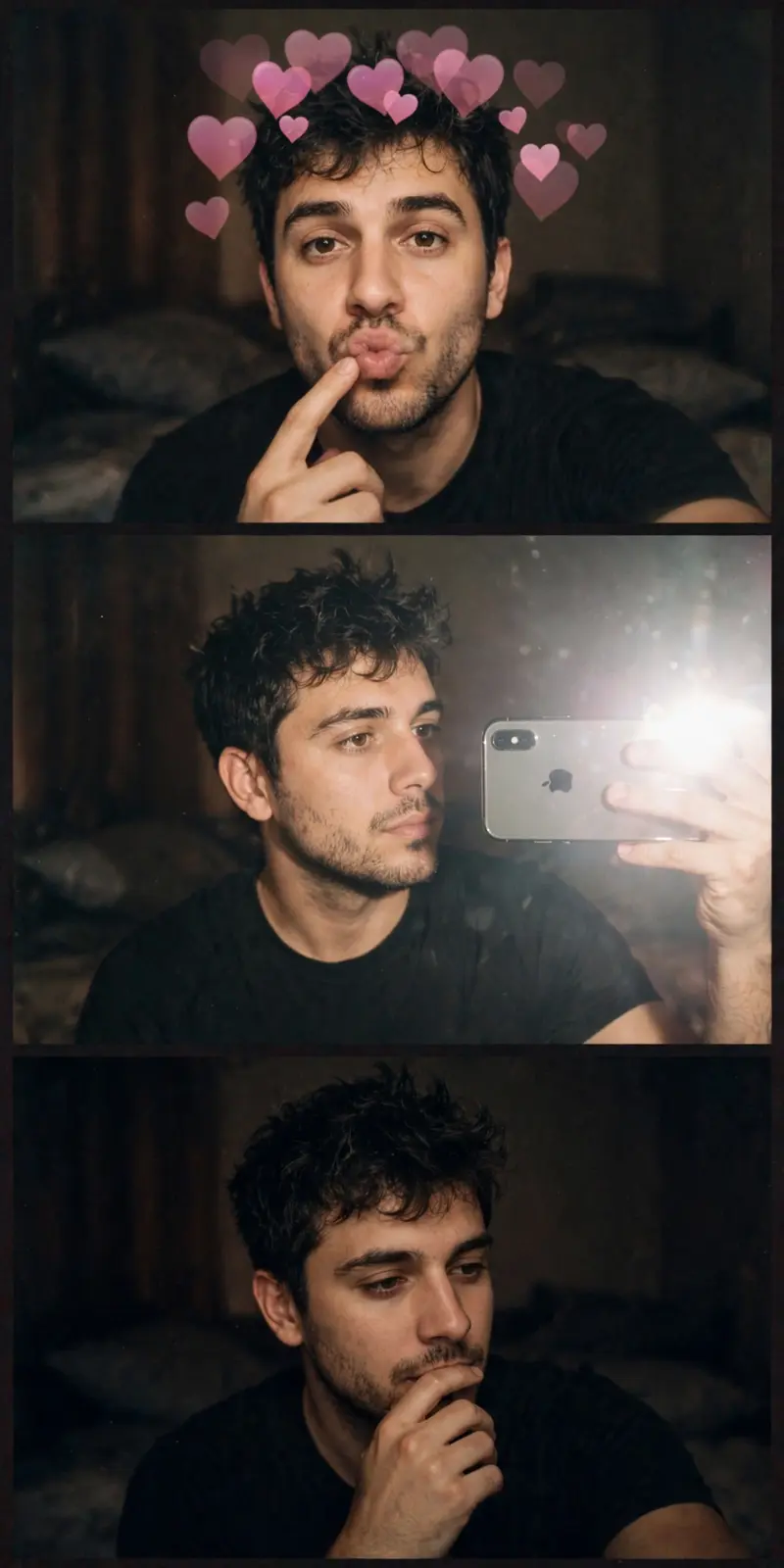
Using the attached face photo exactly as-is, create a vertical 3-frame low- resolution webcam collage. Absolute face rules: Do NOT alter the face under any circumstances. Preserve facial feature proportions exactly: face shape, eye size, nose, mouth, jawline. Do NOT make the subject look younger, cuter, or beautified. Do NOT change the gender of the person in the input photo. Do NOT generate any new person (neither opposite nor same gender). Hairstyle: Keep the original hairstyle. Do not change length, parting, or curls. Only allow a naturally slightly messy, rough look. Shooting tone & color (match reference): Match the exact color tone of the attached reference photo. Dark, warm gray tone. MacBook Photo Booth–style color bleed and hazy glow. Low saturation, low contrast, overall soft and blurry feel. Strong grain and noise characteristic of low-resolution webcam quality. Texture includes flash bloom, screen light leaks, and subtle color misalignment mixed together. Background: Simple, warm-toned bedroom. Minimal background detail. Keep it dark and hazy. Outfit rules (based on input photo): If the input photo is female → wear a black camisole in all frames. If the input photo is male → wear a black short-sleeve T-shirt in all frames. Frame 1: Exaggerated pouty lips expression. Finger near the mouth. Accurately recreate the default MacBook Photo Booth heart effect. Do NOT use a single heart emoji. Multiple semi- transparent pink hearts floating above and around the head. Hearts vary in size and position, overlapping like layered elements. Maintain a rough, composited-on- webcam Photo Booth look. Frame 2: Holding an iPhone XS horizontally in one hand. Clearly show the iPhone XS’s rounded corners and dual-camera design. Styled as a mirror selfie scenario. Composition shows taking a mirror selfie while facing the MacBook webcam. Flash is on, creating strong light bloom and flare near the lens. Head slightly turned to the side. Eyes naturally looking at their reflection on the screen. Casual, everyday selfie feeling—no exaggerated posing. Frame 3: Dramatic late-night mood. Darker lighting with emphasized shadows. Hand gesture brought near the mouth. Emotion is calm, dreamy, and atmospheric. Important additional instructions: Use only the single person from the input photo. Do NOT change gender, face, or overall mood. Style changes must apply only through lighting, color, noise, and effects. Use the exact same face consistently across all frames.
How to Use This Prompt with ChatGPT & Gemini
Click the Copy button above, then open ChatGPT (with image generation) or Gemini. Paste the prompt, hit generate, and wait a few seconds. You can tweak any detail — colors, lighting, mood — to make it your own.
How to Keep Your Face Unchanged
Want your own face in this style? First generate the base image with the prompt above, then use a face-swap tool like InsightFace or the Remini app to place your face onto the result.
Want to explore more? Our prompt seen photo section has plenty to choose from.