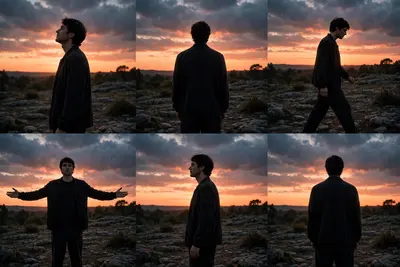
Create an exact 10-second, 16:9 landscape, 30fps, normal real-time-speed, ultra-photorealistic cinematic live-action video using @IMAGE1 as the strict character identity reference. @IMAGE1 controls ONLY the main character’s exact identity: preserve the same face shape, facial structure, facial proportions, eyes, eyebrows, nose, lips, jawline, cheeks, chin, skin tone, natural asymmetry and recognizable identity with zero face replacement, face morphing, beautification, age change, generic AI face or identity drift. Keep the character’s visible hairstyle consistent with @IMAGE1, but do not allow @IMAGE1 to change the explicitly described wardrobe, environment, actions, camera or timing. Reproduce the following complete six-shot sequence in exact chronological order. The visual setting throughout is an outdoor rocky, uneven open landscape at sunset, with a dark low tree line and scattered rocks/rough ground in the distance, a dramatic orange-pink sunset sky beneath darker blue-gray clouds, and the character mostly appearing as a dark silhouette because the bright sunset is behind him. Use natural sunset illumination and realistic silhouette contrast. No text, captions, emojis, logos or watermarks. SHOT 1 — 0.00–1.96 sec: Static side-profile composition. The main character stands in the rocky open landscape, positioned around the center-right portion of the frame, shown from the side facing screen-left. His body is upright and still, with both arms naturally down beside his body. His head is tilted slightly upward as he looks toward the sky/horizon rather than toward the camera. Preserve the quiet stationary posture and subtle natural body movement only; do not add walking or hand gestures. The character appears almost completely silhouetted against the bright orange sunset, with the dark uneven terrain and low vegetation/tree line beneath the sky. Camera remains fixed at approximately the same medium-long side-profile distance and height; no pan, tilt, tracking, orbit, dolly, push-in or zoom. The shot simply holds on the character looking upward. SHOT 2 — 1.96–3.62 sec: Static rear-view composition. The character is now shown from directly behind, standing in the same rocky open landscape and facing away from the camera toward the sunset. He is centered in the frame, full body/near-full body visible. His shoulders are relaxed, torso upright and arms hang naturally beside him; no deliberate hand gesture or walking occurs. His head remains directed toward the distant horizon. The dark silhouette of his upper body contrasts against the orange sky, with rocky ground, low vegetation and distant tree silhouettes visible around him. Keep the camera completely static and preserve the same rear framing and distance. No invented camera movement. SHOT 3 — 1.66 sec within the overall sequence, beginning immediately after Shot 2: Static side-profile walking shot. The character is again viewed from the side, facing and moving toward screen-right across the uneven rocky ground. At the beginning he is slightly leaned forward with his head angled downward; he then straightens somewhat while continuing the walk. His arms hang naturally and swing subtly with the walking rhythm, with the hands remaining relaxed. His legs perform ordinary natural walking steps with visible weight transfer from one foot to the other. Preserve the actual forward walking direction, natural pace and body rhythm; do not add running, posing or exaggerated gestures. The character moves laterally through the frame while the camera remains stationary. The orange sunset, dark cloud layer, low vegetation and scattered rocky terrain remain fixed in the background. No tracking or camera follow. SHOT 4 — 1.85 sec within the overall sequence, immediately after Shot 3: Static frontal silhouette composition. The character stands facing generally toward the camera, centered against the bright orange sky. He begins with both arms hanging down naturally beside his body. He then slowly raises and opens both arms outward from his sides in a symmetrical, relaxed motion. The elbows extend away from the torso and the forearms/hands move outward until both arms are held widely apart at approximately lower shoulder/chest level, with the hands relaxed and slightly lowered. His torso remains mostly upright and centered while the arms perform the primary movement. His head stays generally forward with only the natural small movement accompanying the pose. Do not add spinning, jumping, walking or additional gestures. The camera remains completely static in the same frontal medium-long framing. The dark silhouette is strongly backlit by the orange sunset, with the low dark horizon and rocks beneath it. SHOT 5 — 1.80 sec within the overall sequence, immediately after Shot 4: Static side-profile composition. The character is again standing still in profile, facing screen-left. His arms have returned to a relaxed position beside his body rather than remaining extended. He stands upright on the uneven rocky ground and looks toward the left/horizon. There is no walking and no deliberate hand movement. Preserve only subtle natural posture and head movement. The background contains the same rocky terrain, distant low vegetation/tree silhouettes and orange sunset beneath darker clouds. The camera remains fixed with no pan, tilt, tracking, dolly, zoom or orbit. Maintain the strong backlit silhouette appearance. SHOT 6 — 0.97 sec, immediately after Shot 5 through exactly 10.00 sec: Static rear view. The character stands facing away from the camera toward the sunset, centered in the frame. His upper body is upright and relaxed, with both arms naturally down near his sides. His head faces forward toward the distant horizon. No walking, turning or additional gesture occurs during this final moment. The rocky open landscape, low distant tree line and dramatic orange sunset remain visible behind him. The camera is stationary and does not move. End on the still rear silhouette without adding any new action. CONTINUITY AND PHYSICAL REALISM: The same single male character remains present throughout all six shots. Preserve identical identity, body proportions, hairstyle and wardrobe continuity from @IMAGE1 while following the scene-specific silhouette appearance. The visible clothing should remain a dark/black loose outer top or long-sleeve garment with dark loose trousers; because the strong backlighting obscures fine garment details, do not invent specific logos, patterns, pockets or accessories that cannot be clearly established. Footwear is not clearly distinguishable in the silhouette, so do not invent its design or color. Maintain realistic fabric behavior, natural human anatomy, realistic walking mechanics in Shot 3, and natural arm movement in Shot 4. All scene changes are simple shot changes; do not create a physical camera movement connecting them. STRICT NEGATIVE CONSTRAINTS: No slow motion, speed ramping, time remapping, freeze frames, artificial zoom, whip movement, flash transition, transition wipe, beat-cut effect, editing-based camera shake, artificial motion blur, added cinematic camera movement, text, subtitles, captions, emojis, logos, watermark, music-video graphics, extra people, extra objects, extra props, new locations, new actions, new gestures, new expressions, new story elements or invented environmental details. Do not reproduce the visible social-media text overlays from the source. Preserve only genuine character movement, genuine environmental movement and the static camera behavior. Normal real-time 1x physical motion throughout. FINAL DURATION: EXACTLY 10.00 SECONDS.

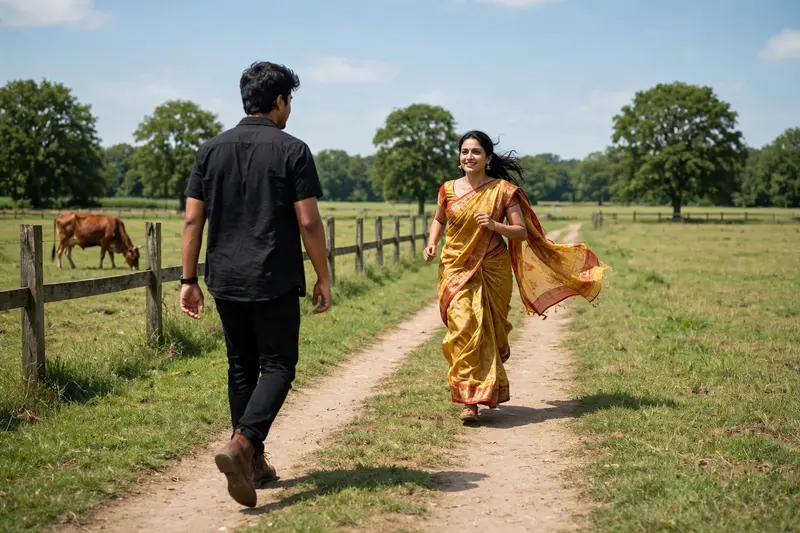
![Maintain exact face identity and features from [Reference Image 1]. A cinematic medium-to-wide shot of the subject walking forward down the center of](/wp-content/uploads/2026/10/thumbs/1157.webp)