Rolex Luxury Collection Cover
Best Rolex Luxury Collection Cover AI Prompt
Copy the ready-made prompt below and paste it into ChatGPT, Gemini, or your favorite AI image generator to create a stunning streetwear fashion style image in seconds. No sign-up needed — just copy, paste, and generate.
⋈ AI PROMPT
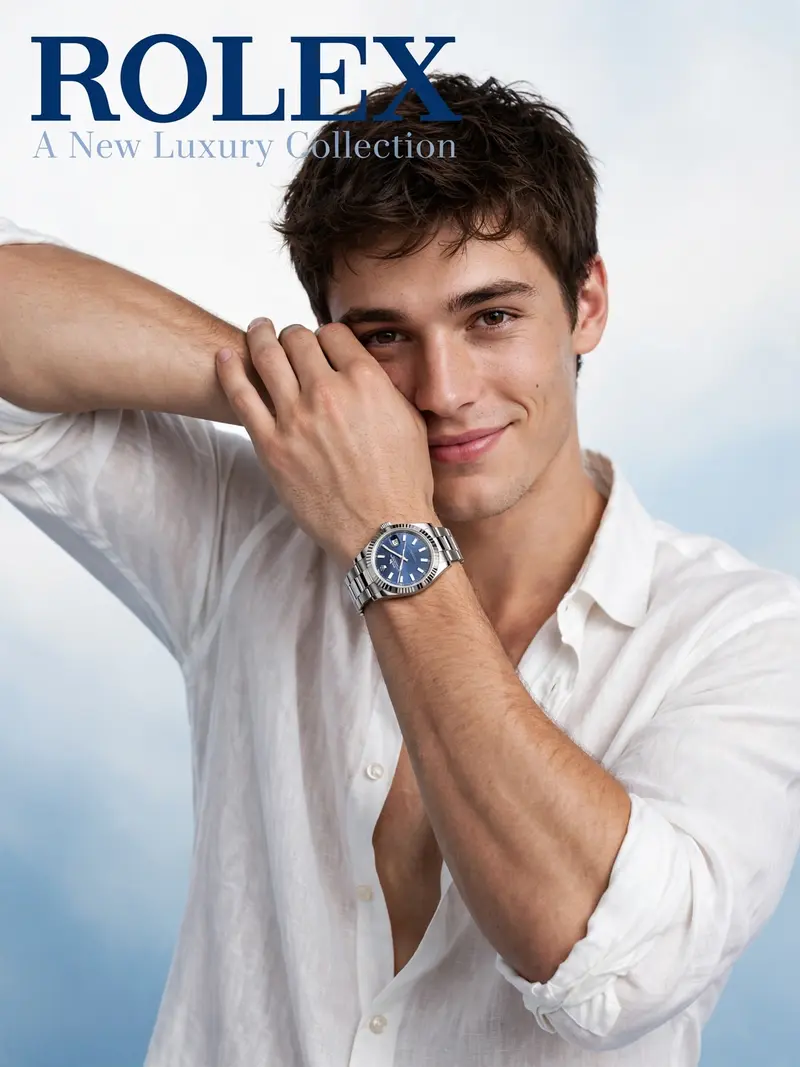
Create A white and blue gradient soft studio background with the text 'ROLEX' bold and top left'A New Luxury Collection' behind rolex text, fashion editorial cover of the portrait of A natural-looking man with a defined jawline, a 19-year-old man with a muscular and fit physique. He looking at the camera with cute and engaging expression, shy smile. He wears a loose open neck very deep white shirt with rolled sleeves, some buttons are open, arm partly covering his face metallic luxur
How to Use This Prompt with ChatGPT & Gemini
Click the Copy button above, then open ChatGPT (with image generation) or Gemini. Paste the prompt, hit generate, and wait a few seconds. You can tweak any detail — colors, lighting, mood — to make it your own.
How to Keep Your Face Unchanged
Want your own face in this style? First generate the base image with the prompt above, then use a face-swap tool like InsightFace or the Remini app to place your face onto the result.