Regal Indian Warrior-Prince
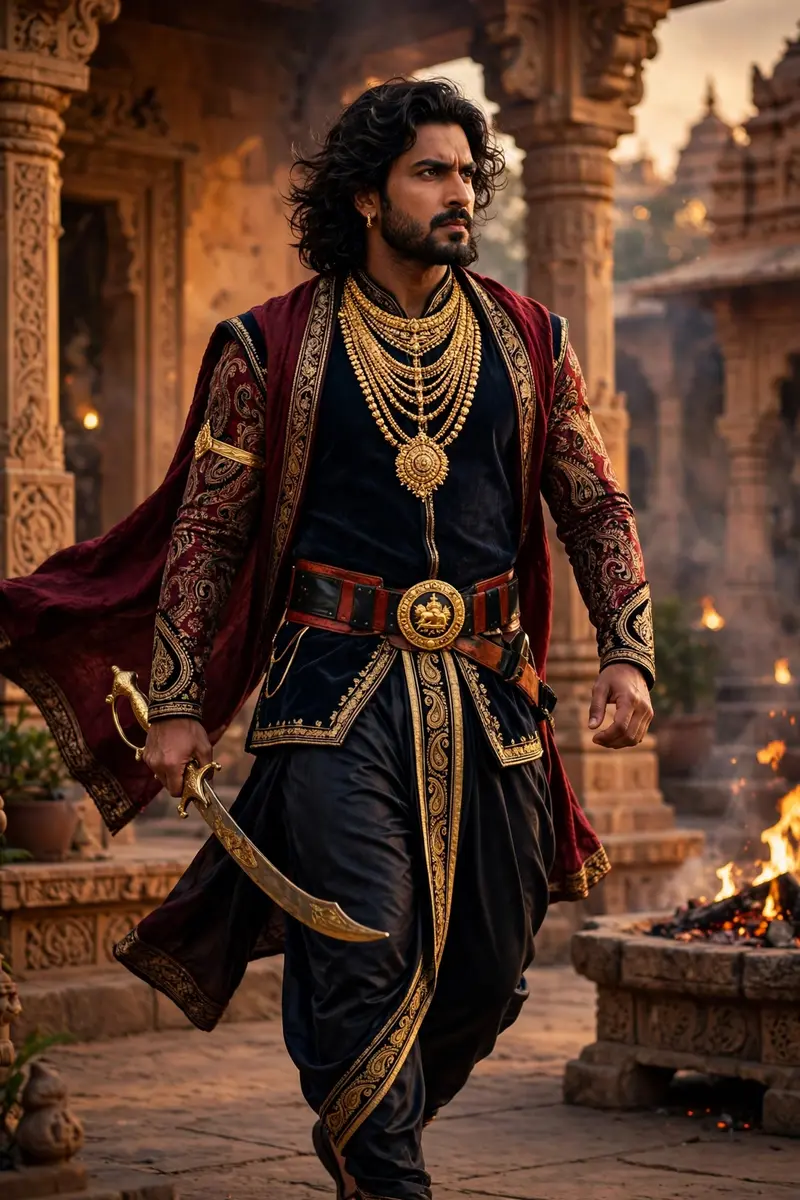
Best Regal Indian Warrior-Prince AI Prompt
Copy the ready-made prompt below and paste it into ChatGPT, Gemini, or your favorite AI image generator to create a stunning photoreal portraits style image in seconds. No sign-up needed — just copy, paste, and generate.
⋈ AI PROMPT
Full-body shot; Regal Indian warrior-prince (face from uploaded picture) Strong, heroic, and intense expression; midium Long, wavy, dark hair; Neatly trimmed beard and mustache; Commanding pose mid-stride; Dark navy/black silk dhoti/trousers; Gold-bordered sash on the leg; Sleeveless dark navy tunic/vest; Long sleeves of rich maroon fabric; Intricate gold and black paisley/floral print on sleeves; Deep maroon shawl/stole; Wide red and black leather belt; Large circular gold belt buckle with insignia; Multiple layers of heavy, intricate gold necklaces; Prominent gold pendant on chest; Gold-hilted curved sword; Warm, golden, dramatic lighting; under Royal palace or temple courtyard setting; Background of ochre/terracotta stone architecture; Visible flames/fire pit in the background; Cinematic, high-definition style; Powerful and regal tone.
How to Use This Prompt with ChatGPT & Gemini
Click the Copy button above, then open ChatGPT (with image generation) or Gemini. Paste the prompt, hit generate, and wait a few seconds. You can tweak any detail — colors, lighting, mood — to make it your own.
How to Keep Your Face Unchanged
Want your own face in this style? First generate the base image with the prompt above, then use a face-swap tool like InsightFace or the Remini app to place your face onto the result.