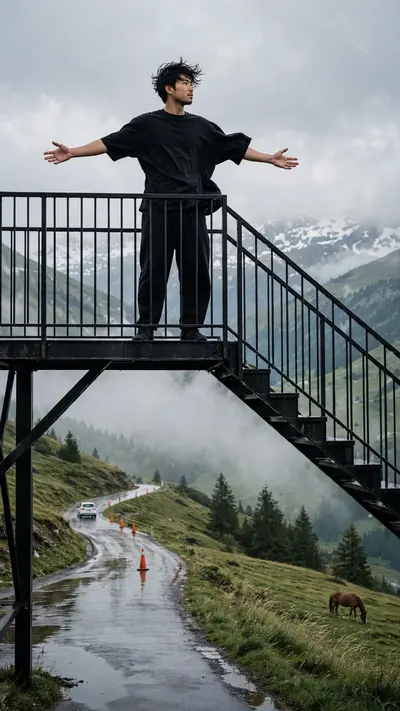
Animate the uploaded 6-panel storyboard collage into ONE continuous premium ultra-realistic horizontal 9:16 cinematic mountain video, approximately 10 seconds long. REFERENCE PRIORITY: The separately uploaded clear person photo is the PRIMARY and ABSOLUTE identity reference. The storyboard collage is ONLY the secondary reference for: scene order, outfit, location, poses, camera framing, staircase, wet road, meadow, horse and mountains. Never derive or reconstruct the person’s face from the small faces inside the collage. Always preserve the exact face from the original clear uploaded person photo. IDENTITY LOCK — HIGHEST PRIORITY: Maintain ONE permanently locked facial identity and ONE permanently locked body throughout the entire video. Preserve exactly: face shape, eyes, eyebrows, nose, lips, jawline, ears, skin tone, natural skin texture, hairstyle, hairline, natural age, height, shoulder width, body shape, arm length, leg length and realistic body proportions. Do not regenerate the face after scene transitions. The person visible after every cut must still be the exact same uploaded real person. No beautification. No face reconstruction. No face morphing. No body morphing. OUTFIT LOCK: Keep the same oversized black half-sleeve T-shirt, loose black trousers and dark footwear throughout. No outfit changes. SCENE 1 — 0.0–2.0 sec: Begin with a cinematic low-angle wide shot of the person standing on the upper platform of the black metal staircase. The person slowly opens both arms outward. Use a very subtle camera push-in. Mountain wind gently moves the T-shirt and hair. Face stays stable and natural. SCENE 2 — 2.0–4.0 sec: Smooth cut to a rear three-quarter shot on the wet mountain road. The same person slowly walks forward on reflective asphalt. A white car moves farther down the road. Keep the camera following slowly from behind. No fast movement. SCENE 3 — 4.0–6.1 sec: Cut back to the black hillside staircase. The same person slowly descends several steps. Use a stable medium-long shot. One hand naturally touches the railing. When the face becomes visible, restore the exact original uploaded face without any identity change. SCENE 4 — 6.1–9.5 sec: Cut to a medium full-body portrait on the wet highway. The person stands almost still and slowly looks upward toward the cloudy mountain sky. Only subtle breathing, blinking and head movement. Use a gentle slow push-in. Keep the face large, sharp and identical to the uploaded photo. Orange road cones, wet reflections and green hills remain behind. SCENE 5 — 9.5–11.8 sec: Soft cinematic transition to the alpine meadow. The same person sits peacefully on green grass looking toward the snowy mountains. A horse grazes naturally a short distance away. Use an extremely slow camera pull-back. Keep the subject’s body shape and outfit unchanged. SCENE 6 — 11.8–14.0 sec: Return to the black metal staircase. The person stands confidently on the upper platform. Slowly open both arms. Finish with a subtle cinematic pull-back revealing the green hillside, tall trees and cloudy sky. Keep the uploaded person’s exact identity until the final frame. FACE CONSISTENCY RULES: Prioritize identity stability over dramatic animation. Whenever the face is visible: use front or three-quarter angles, keep the head movement slow, keep the face sharp, avoid motion blur over facial features. No extreme facial expressions. No rapid head rotation. No face hidden by objects. No camera orbit around the face. No sudden profile-to-front transformation. CAMERA: Slow push-in, stable follow shot, gentle staircase tracking, slow portrait push-in, slow meadow pull-back, final wide pull-back. No shaky camera. No fast zoom. No fisheye. No random camera movement. COLOUR GRADING: Maintain the same premium realistic cold mountain grade throughout: soft grey overcast sky, cool shadows, deep natural green vegetation, muted saturation, realistic skin, wet asphalt reflections, subtle atmospheric mist, soft highlights, gentle contrast, subtle film grain. MOTION: Natural breathing, subtle blinking, gentle walking, correct stair stepping, realistic clothing movement, natural wind, realistic horse movement. No unnatural body movement. FINAL QUALITY: Ultra-realistic live-action footage, authentic skin texture, realistic hair, correct anatomy, natural wet surfaces, real mountain atmosphere, professional cinematic depth, premium 4K quality. NEGATIVE: No face change, no identity drift, no similar generated person, no face swap, no face morphing, no facial reconstruction, no beauty filter, no skin smoothing, no hairstyle change, no age change, no body change, no height change, no outfit change, no duplicate person, no extra limbs, no broken hands, no distorted feet, no cartoon, no anime, no fake CGI, no text, no logo, no watermark.