Photo with Ganesh Ji
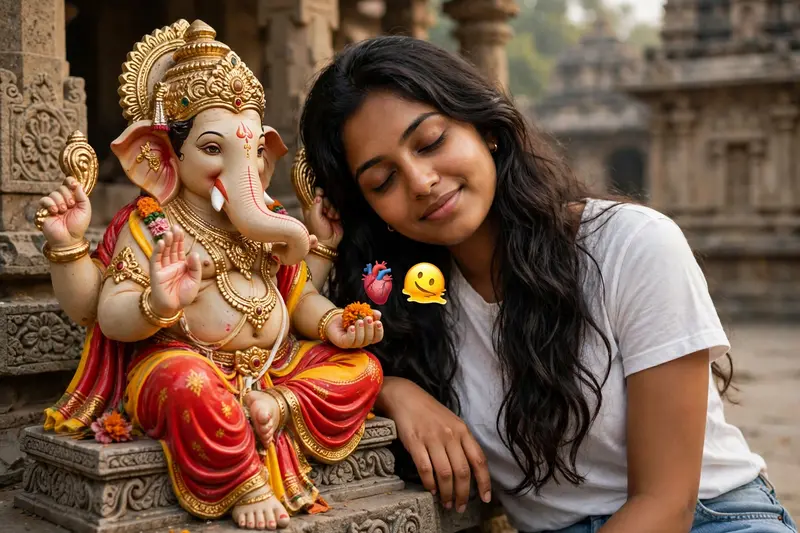
Best Photo with Ganesh Ji AI Prompt
Copy the ready-made prompt below and paste it into ChatGPT, Gemini, or your favorite AI image generator to create a stunning photoreal portraits style image in seconds. No sign-up needed — just copy, paste, and generate.
✦ AI PROMPT
A medium close-up shot captures a young South Asian woman with long, dark wavy hair, leaning her head gently against a detailed, colorful statue of the Hindu deity Ganesha. The woman has a serene expression with her eyes closed, wearing a simple white top and light blue jeans. She is positioned on the right side of the frame, resting her hand near the statue. The Ganesha idol, seated on the left, is intricately adorned with a gold crown, opulent gold jewelry, and a vibrant red and yellow dhoti, with its trunk turned to the left and one hand raised in a gesture of blessing. The background consists of architectural stone elements, suggesting an outdoor temple or courtyard setting. The lighting is soft and diffused, creating a peaceful, devotional atmosphere. A small, floating anatomical heart emoji and a melting smiley face emoji are present near the center of the composition. The overall aesthetic is warm and candid, focusing on the intimate and respectful connection between the woman and the sacred figure.
How to Use This Prompt with ChatGPT & Gemini
Click the Copy button above, then open ChatGPT (with image generation) or Gemini. Paste the prompt, hit generate, and wait a few seconds. You can tweak any detail — colors, lighting, mood — to make it your own.
How to Keep Your Face Unchanged
Want your own face in this style? First generate the base image with the prompt above, then use a face-swap tool like InsightFace or the Remini app to place your face onto the result.