Mughal Majesty Cinematic 8K Video Prompt
Best Mughal Majesty Cinematic 8K Video Prompt AI Prompt
Copy the ready-made prompt below and paste it into ChatGPT, Gemini, or your favorite AI image generator to create a stunning video prompts style image in seconds. No sign-up needed — just copy, paste, and generate.
⋈ AI PROMPT
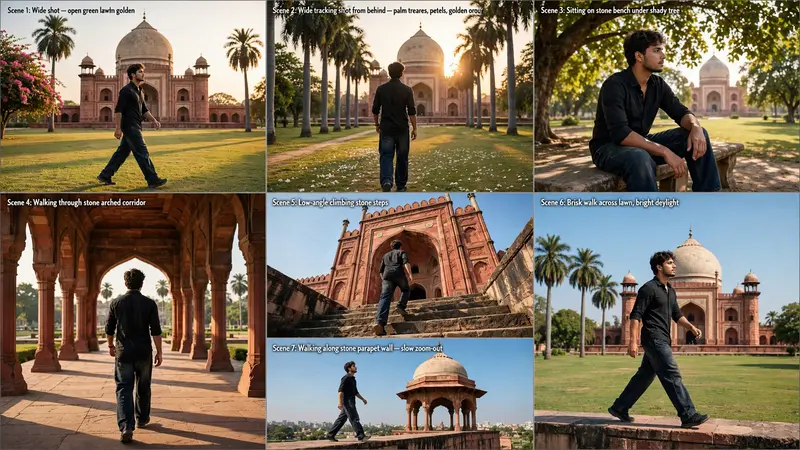
"A cinematic ultra-realistic 8K video (16:9) of a young man wearing a baggy relaxed-fit denim jeans and a stylish premium fitted shirt, walking and moving around a grand Mughal-era red-sandstone domed mausoleum with palm trees, golden-hour to bright daylight lighting. CRITICAL: use the uploaded reference photo as the exact identity source — same face, same facial features, same exact skin tone and skin texture as the person in the uploaded photo, same body, maintained precisely in every scene, zero identity variation or face change between scenes. This must work accurately for any person of any age or skin tone who uploads their own reference photo — the generated face and skin must always match the uploaded photo exactly, never a generic or different face. Scene 1: Wide shot — he walks steadily across an open green lawn in front of the grand domed monument, tall palm trees and a flowering tree nearby, warm golden sunlight casting long shadows, natural confident walking pace. Scene 2: Wide tracking shot from behind — he walks forward between tall palm trees toward the monument, warm golden-hour sunlight glowing behind the dome, white flower petals scattered on the grass, cinematic depth. Scene 3: He walks toward a stone bench under a large shady tree, then sits down gracefully, resting one arm on his knee while gazing at the monument in the distance, dappled sunlight through the leaves, calm cinematic pause with natural sitting motion. Scene 4: He walks through a stone arched corridor lined with pillars, warm sunlight and shadows streaking across the floor, greenery visible through the far archway, steady cinematic walking motion from behind. Scene 5: Low-angle shot — he climbs a set of old stone steps toward a red-sandstone archway entrance, bright blue sky above, dramatic upward framing, purposeful climbing motion. Scene 6: Wide shot — he walks briskly back across the open lawn with the full monument and palm trees behind him, bright blue sky, crisp natural daylight, energetic confident walking pace. Scene 7: Final low-angle shot — he walks along a stone parapet wall with the monument's domed chhatri (pavilion) towering behind him against a clear blue sky, steady forward walking motion, cinematic slow zoom-out to finish. Overall style: same face, same identity, same exact skin tone, same body, same baggy jeans and premium shirt outfit consistent in every scene, no identity change, same real Mughal-era monument location throughout — domed mausoleum, palm-lined lawn, shaded bench, arched stone corridor, stone steps, and parapet wall — natural continuous walking and movement in every single scene, realistic skin and fabric texture, warm golden-to-bright cinematic color grading, natural sunlight with soft lens flares, filmic contrast and depth, smooth cinematic transitions between angles, ultra-realistic premium 8K quality, 16:9 widescreen format, continuous story flow from start to end, no scene skipped."
How to Use This Prompt with ChatGPT & Gemini
Click the Copy button above, then open ChatGPT (with image generation) or Gemini. Paste the prompt, hit generate, and wait a few seconds. You can tweak any detail — colors, lighting, mood — to make it your own.
How to Keep Your Face Unchanged
Want your own face in this style? First generate the base image with the prompt above, then use a face-swap tool like InsightFace or the Remini app to place your face onto the result.
![Maintain exact face identity and features from [Reference Image 1]. A cinematic medium-to-wide shot of the subject walking forward down the center of](/wp-content/uploads/2026/10/thumbs/1157.webp)