
Moody Studio Portrait For Boys
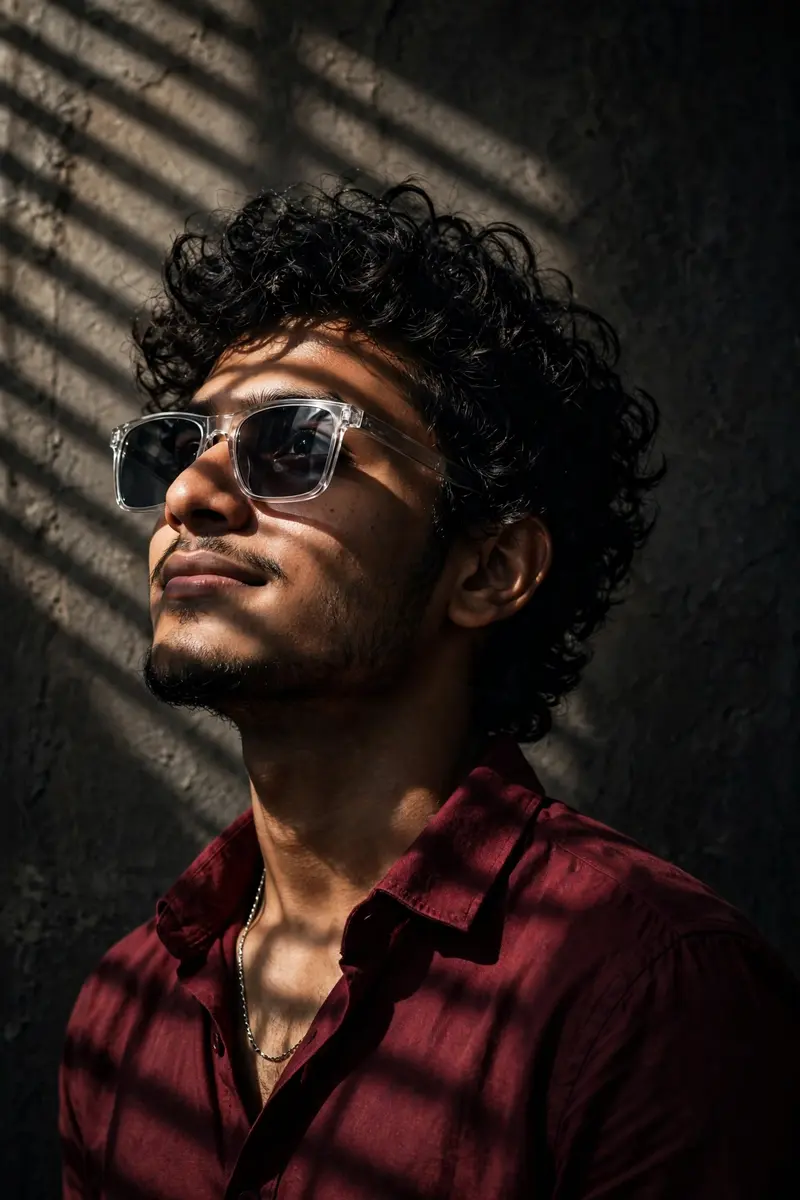
Best Moody Studio Portrait For Boys AI Prompt
Copy the ready-made prompt below and paste it into ChatGPT, Gemini, or your favorite AI image generator to create a stunning photoreal portraits style image in seconds. No sign-up needed — just copy, paste, and generate.
✦ AI PROMPT
Create portrait of a young South man (same as reference image), appearing to be in his early 20s, is posed against a dark, textured background. He has curly dark hair, a neatly trimmed beard, and a light mustache. His facial expression is a slight smirk, with his gaze directed upwards and to the left. He is wearing a dark red, long-sleeved collared shirt, partially unbuttoned, revealing a silver chain around his neck. He also wears modern, rectangular sunglasses with clear frames. The man is positioned on the left side of the frame, in a medium shot, with his body angled slightly away from the viewer. Dramatic lighting casts strong shadows across his face and shirt, highlighting textures and contours, creating a moody and sophisticated atmosphere. A distinct light pattern, possibly from window blinds or foliage, falls across his forehead and the upper left portion of the background. The perspective is slightly from below, looking up at the subject, emphasizing his features and presence. The overall style is realistic with a cinematic quality.
How to Use This Prompt with ChatGPT & Gemini
Click the Copy button above, then open ChatGPT (with image generation) or Gemini. Paste the prompt, hit generate, and wait a few seconds. You can tweak any detail — colors, lighting, mood — to make it your own.
How to Keep Your Face Unchanged
Want your own face in this style? First generate the base image with the prompt above, then use a face-swap tool like InsightFace or the Remini app to place your face onto the result.



