
Monochrome Studio Wall Portrait
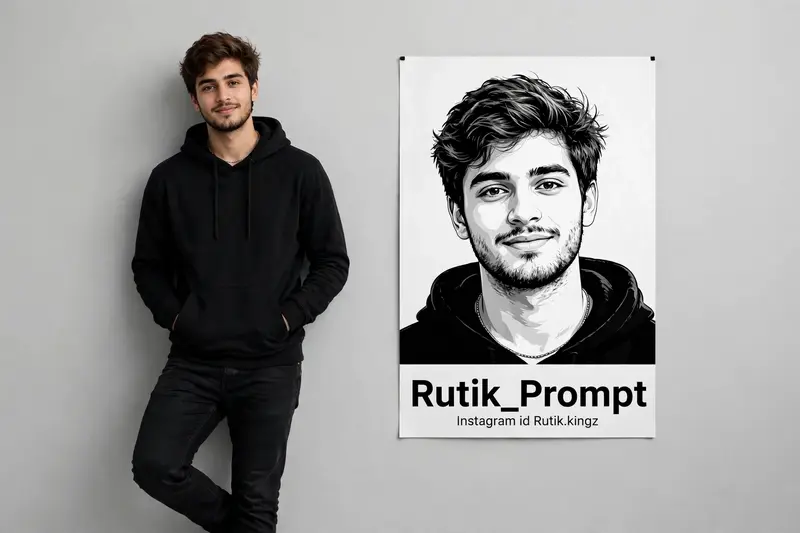
Best Monochrome Studio Wall Portrait AI Prompt
Copy the ready-made prompt below and paste it into ChatGPT, Gemini, or your favorite AI image generator to create a stunning photoreal portraits style image in seconds. No sign-up needed — just copy, paste, and generate.
⋈ AI PROMPT
He is casually and unpretentiously leaning against a smooth, light gray studio wall; his hands are in his pockets and one leg is crossed over the other, with relaxed and confident body language. Add to the wall next to him a prominent black and white vector portrait of his face and chest just below the information: Rutik_Prompt, and below the name: Instagram id Rutik.kingz” Use The Face From The Uploaded Reference Image And Preserve The Same Facial Features – Do Not Alter The Face
How to Use This Prompt with ChatGPT & Gemini
Click the Copy button above, then open ChatGPT (with image generation) or Gemini. Paste the prompt, hit generate, and wait a few seconds. You can tweak any detail — colors, lighting, mood — to make it your own.
How to Keep Your Face Unchanged
Want your own face in this style? First generate the base image with the prompt above, then use a face-swap tool like InsightFace or the Remini app to place your face onto the result.



