Minimalist Birthday Poster Photo Prompt
Best Minimalist Birthday Poster Photo Prompt AI Prompt
Copy the ready-made prompt below and paste it into ChatGPT, Gemini, or your favorite AI image generator to create a stunning photoreal portraits style image in seconds. No sign-up needed — just copy, paste, and generate.
⋈ AI PROMPT
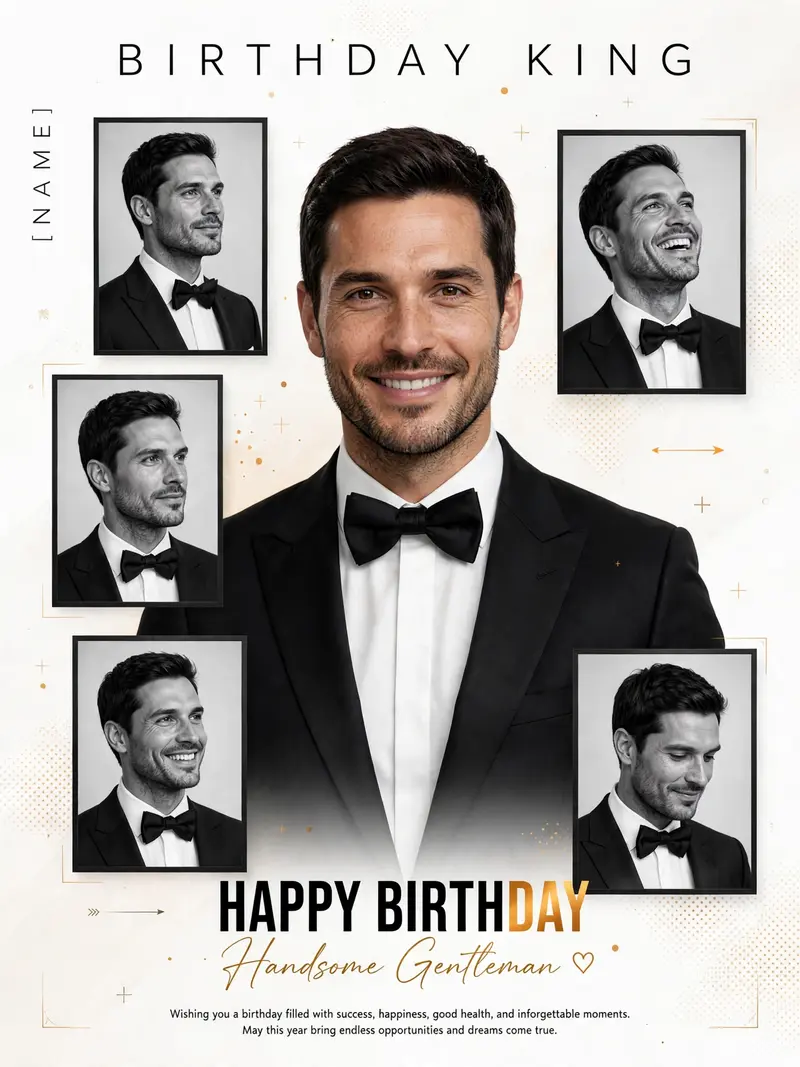
Create a premium minimalist birthday poster in a 3:4 ratio featuring the uploaded man as the main subject. Place one large color portrait in the center wearing a tailored black tuxedo with a white shirt and black bow tie (or an elegant black suit), looking confidently at the camera with a natural smile. Surround the main portrait with five black-and-white framed portraits in a modern luxury magazine collage layout featuring different expressions and angles. Use a clean white background with subtle gradients, dotted patterns, minimalist crosses, thin corner lines, stylish arrows, and golden-orange accent dots. Add "BIRTHDAY KING" at the top with wide letter spacing, "[NAME]" vertically on the left, bold "HAPPY BIRTHDAY" at the bottom with "DAY" in luxurious golden orange, and "Handsome Gentleman ♡" in elegant handwritten script below. Include the message: "Wishing you a birthday filled with success, happiness, good health, and unforgettable moments. May this year bring endless opportunities and dreams come true." Lighting: Soft luxury studio lighting with premium editorial shadows. Camera: Sony A1, 85mm lens, f/2, HDR. Style: Ultra-realistic 8K, luxury fashion editorial, premium magazine cover aesthetic, crisp modern typography, photorealistic skin, highly detailed tailored suit fabric, sharp focus, balanced composition, clean luxury design.
How to Use This Prompt with ChatGPT & Gemini
Click the Copy button above, then open ChatGPT (with image generation) or Gemini. Paste the prompt, hit generate, and wait a few seconds. You can tweak any detail — colors, lighting, mood — to make it your own.
How to Keep Your Face Unchanged
Want your own face in this style? First generate the base image with the prompt above, then use a face-swap tool like InsightFace or the Remini app to place your face onto the result.