
Luxury Red Background Portrait Prompt
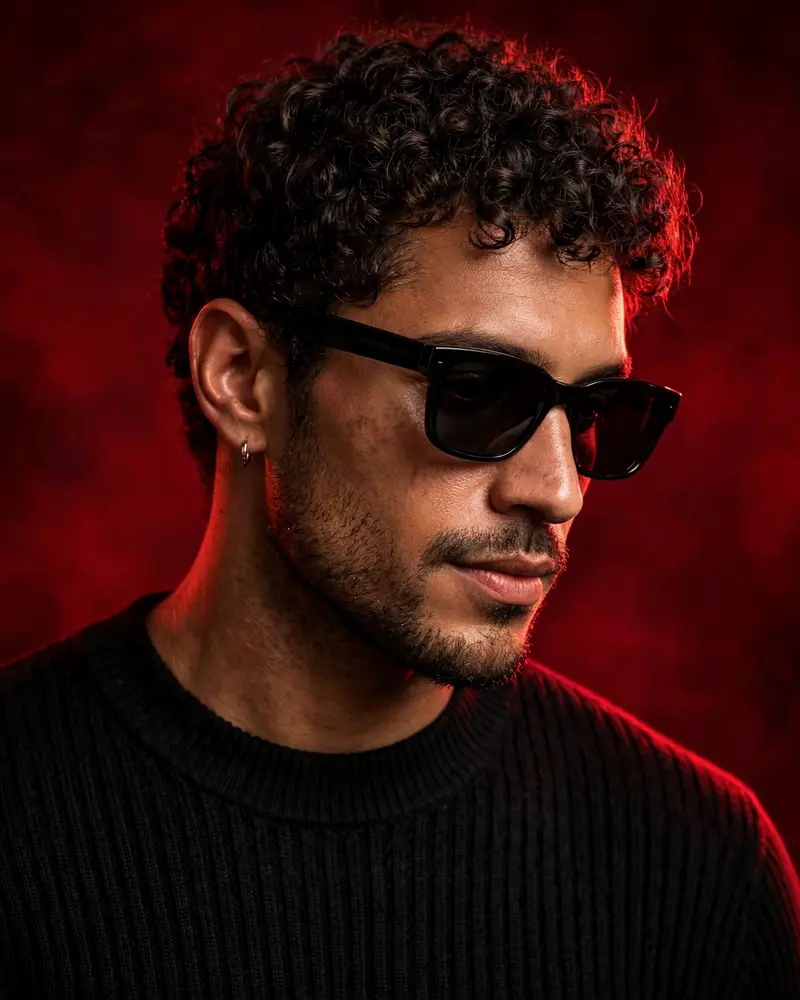
Best Luxury Red Background Portrait Prompt AI Prompt
Copy the ready-made prompt below and paste it into ChatGPT, Gemini, or your favorite AI image generator to create a stunning photoreal portraits style image in seconds. No sign-up needed — just copy, paste, and generate.
⋈ AI PROMPT
Use the uploaded reference image as the exact identity of the person. STRICT IDENTITY LOCK: Preserve 100% facial structure, skin tone, hairstyle, facial features, age, and identity. Do not alter the face, hair, skin texture, or any natural characteristics. Maintain complete likeness to the reference image. OUTFIT: Premium black ribbed knit sweater, sleek black rectangular sunglasses, small silver hoop earring, luxury men's fashion styling, clean and sophisticated look. POSE: Head slightly lowered, face turned subtly to the side, confident expression, subtle smile, looking slightly past the camera, relaxed yet powerful posture. SCENE: Luxury studio portrait, deep crimson-red gradient background, rich dark-red cinematic backdrop, minimal composition, premium editorial atmosphere. LIGHTING: Soft beauty lighting on the face, dramatic red rim light outlining the hair and shoulders, cinematic shadows, high contrast, luxury fashion-magazine lighting. CAMERA: Chest-up portrait, 85mm lens, shallow depth of field, ultra-sharp facial details, professional DSLR quality, subject in perfect focus. STYLE: Luxury men's fashion editorial, viral Instagram portrait, ultra-realistic photography, premium color grading, magazine-cover aesthetic, high-end commercial campaign, cinematic mood, luxury lifestyle branding. QUALITY: Photorealistic, 8K detail, natural skin texture, sharp focus, professional retouching, premium fashion photography, highly detailed, realistic lighting. ASPECT RATIO: 4:5
How to Use This Prompt with ChatGPT & Gemini
Click the Copy button above, then open ChatGPT (with image generation) or Gemini. Paste the prompt, hit generate, and wait a few seconds. You can tweak any detail — colors, lighting, mood — to make it your own.
How to Keep Your Face Unchanged
Want your own face in this style? First generate the base image with the prompt above, then use a face-swap tool like InsightFace or the Remini app to place your face onto the result.



