
Kashful Flower Field Portrait
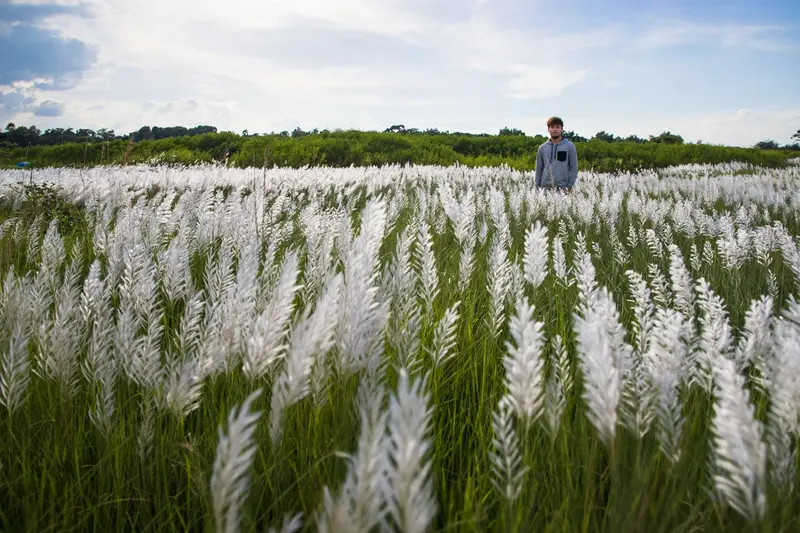
Best Kashful Flower Field Portrait AI Prompt
Copy the ready-made prompt below and paste it into ChatGPT, Gemini, or your favorite AI image generator to create a stunning photoreal portraits style image in seconds. No sign-up needed — just copy, paste, and generate.
⋈ AI PROMPT
Use the uploaded photo as the only identity reference and place the person naturally into a beautiful white Kashful (Kans grass) field like the reference background. Preserve the exact face, facial features, skin tone, hairstyle, body proportions, clothing, pose, hand position, and natural expression without any changes. Make the person appear slightly distant and naturally surrounded by tall white Kash flowers. Match the original background’s soft daylight, bright blue sky, green vegetation, shallow depth of field, realistic perspective, shadows, lighting, colors, and camera quality. Create a highly realistic DSLR photograph.
How to Use This Prompt with ChatGPT & Gemini
Click the Copy button above, then open ChatGPT (with image generation) or Gemini. Paste the prompt, hit generate, and wait a few seconds. You can tweak any detail — colors, lighting, mood — to make it your own.
How to Keep Your Face Unchanged
Want your own face in this style? First generate the base image with the prompt above, then use a face-swap tool like InsightFace or the Remini app to place your face onto the result.



