
Independence Day Cinematic Portrait
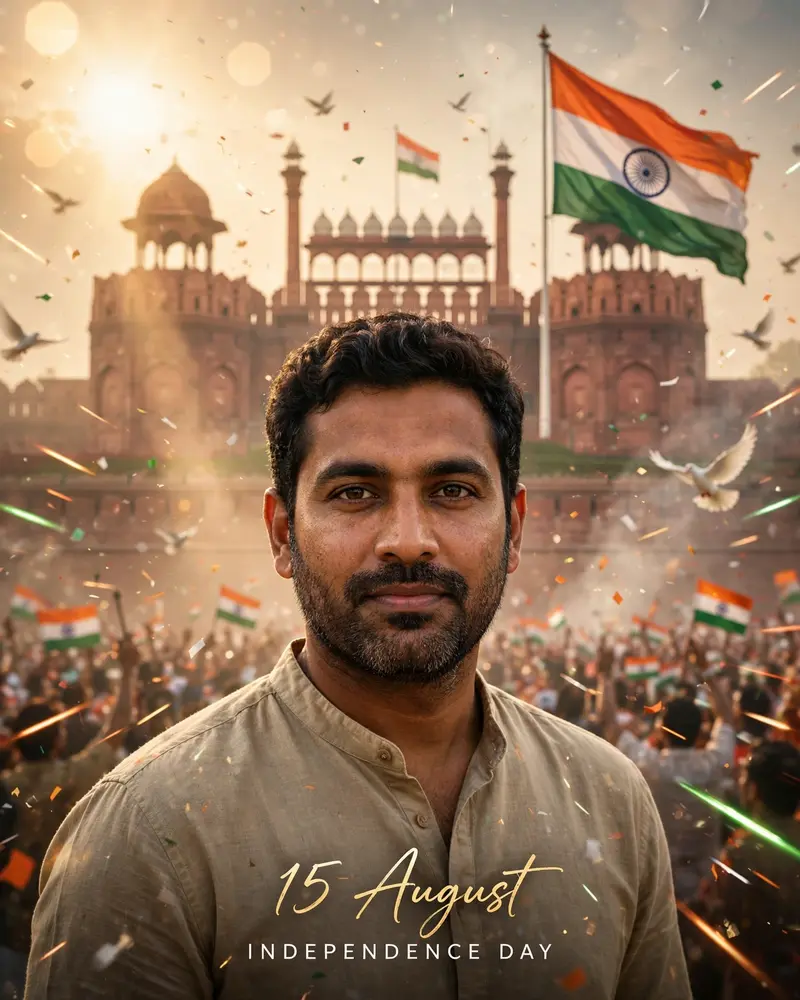
Best Independence Day Cinematic Portrait AI Prompt
Copy the ready-made prompt below and paste it into ChatGPT, Gemini, or your favorite AI image generator to create a stunning photoreal portraits style image in seconds. No sign-up needed — just copy, paste, and generate.
✦ AI PROMPT
Create an ultra-realistic 8K cinematic Independence Day portrait using the uploaded photo as the exact facial reference. Preserve the person's facial identity 100%, including face shape, hairstyle, beard, skin tone, expression, clothing, body proportions, and natural texture without alteration. Position the subject confidently in the foreground, looking proudly toward the camera. In the background, feature the iconic Red Fort with a gigantic Indian National Flag waving dramatically from a tall flagpole. Fill the atmosphere with warm golden sunrise rays piercing through soft morning mist, creating a premium patriotic ambience. Add saffron, white, and green cinematic light streaks, floating tricolor confetti, subtle smoke effects, white doves flying across the sky, and a cheering patriotic crowd silhouette with tiny Indian flags in the distance. Include realistic lens flare, volumetric lighting, HDR reflections, shallow depth of field, and luxury color grading. Use DSLR photography quality, 85mm lens, f/1.8 aperture, ultra-sharp facial details, natural skin pores, realistic shadows, soft cinematic glow, premium contrast, and vibrant tricolor tones. Typography: "15 August" in elegant handwritten calligraphy. "INDEPENDENCE DAY" in clean uppercase beneath it. Vertical 4:5 Instagram poster, masterpiece, ultra-realistic, cinematic, luxury editorial style, 8K UHD, trending Pinterest aesthetic, highly detailed.
How to Use This Prompt with ChatGPT & Gemini
Click the Copy button above, then open ChatGPT (with image generation) or Gemini. Paste the prompt, hit generate, and wait a few seconds. You can tweak any detail — colors, lighting, mood — to make it your own.
How to Keep Your Face Unchanged
Want your own face in this style? First generate the base image with the prompt above, then use a face-swap tool like InsightFace or the Remini app to place your face onto the result.



