Happy Birthday Wishes
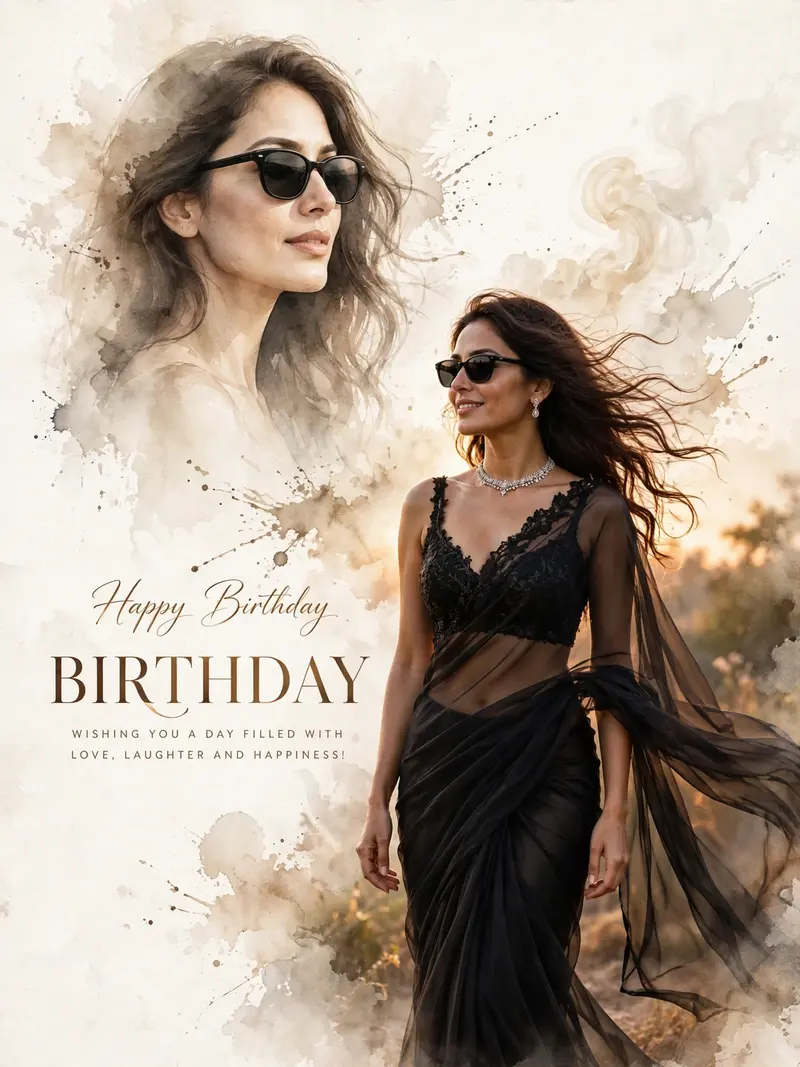
Best Happy Birthday Wishes AI Prompt
Copy the ready-made prompt below and paste it into ChatGPT, Gemini, or your favorite AI image generator to create a stunning photoreal portraits style image in seconds. No sign-up needed — just copy, paste, and generate.
✦ AI PROMPT
Create a 3:4 Ultra HD (4096×5461) hyper-realistic luxury editorial birthday poster using my uploaded face with 100% identity preservation (face, skin tone, hairstyle, facial features, and proportions unchanged). Design a clean ivory-white watercolor paper background with a large sepia watercolor splash, ink textures, soft beige smoke, and a warm vignette. Add a large semi-transparent watercolor portrait in the upper-left wearing slim black sunglasses. Place the main full-body portrait in the lower-right, standing naturally at a 30° angle with a soft smile. Dress the subject in a luxury black transparent chiffon saree with a black embroidered bralette blouse, flowing drapes, long wavy wind-blown hair, slim black sunglasses, a diamond choker, and matching earrings. Use elegant typography: "Happy Birthday" in luxury handwritten script. "Birthday" in a large elegant serif font. "WISHING YOU A DAY FILLED WITH LOVE, LAUGHTER AND HAPPINESS!" in a minimal sans-serif font. Apply golden-hour lighting, warm rim light, soft beauty lighting, cinematic shadows, and warm luxury editorial color grading. Capture with a Canon EOS R5, 85mm f/1.2, f/1.8, shallow depth of field. Render in Octane + Unreal Engine 5 with ray tracing, global illumination, natural skin pores, detailed hair strands, premium Photoshop-quality finish, and ultra-photorealistic output. Negative Prompt: Different face, wrong hairstyle, straight hair, front pose, plastic skin, extra fingers/hands/arms, bad anatomy, cropped body, poor draping, low quality, blurry, watermark, logo, text artifacts, AI artifacts, cartoon, anime, oversaturated colors.
How to Use This Prompt with ChatGPT & Gemini
Click the Copy button above, then open ChatGPT (with image generation) or Gemini. Paste the prompt, hit generate, and wait a few seconds. You can tweak any detail — colors, lighting, mood — to make it your own.
How to Keep Your Face Unchanged
Want your own face in this style? First generate the base image with the prompt above, then use a face-swap tool like InsightFace or the Remini app to place your face onto the result.