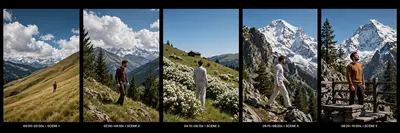
Create an exact 10-second, 16:9 landscape, 30fps, normal real-time-speed, ultra-photorealistic cinematic live-action video using @IMAGE1 ONLY as the strict FACE + IDENTITY + HAIRSTYLE reference for the male character; preserve his exact facial identity, facial proportions, eyes, eyebrows, nose, lips, jawline, ears, skin tone, natural age, hairline, hair length, hair texture and hairstyle from @IMAGE1 in every shot, while the uploaded reference video controls all scene composition, physical performance, outfit, environment, camera framing and movement. Recreate the reference as a continuous five-part mountain-travel sequence, with no invented actions: 00.00–02.00s — SCENE 1: wide distant landscape shot of a grassy golden-green mountain slope under a deep blue sky filled with large white clouds, snow-covered mountain peaks and dark forested ridges in the distance; the male character appears small in the middle/lower portion of the slope and moves naturally along the hillside exactly as visible, maintaining his reference posture and direction, with the expansive landscape dominating the frame; use the same distant wide camera perspective and natural daylight. 02.00–04.10s — SCENE 2: cut to the same mountain viewpoint with the man now clearly visible full-body, wearing the reference-video dark brown/maroon long-sleeve shirt and dark trousers; he begins slightly bent forward with his head lowered, then naturally straightens his torso and stands upright, followed by a subtle head/body turn toward his right while his arms remain relaxed near his sides; reproduce the exact posture progression and calm expression, with rocky grass-covered foreground, pine trees, layered mountains and large clouds behind him; camera remains a stable vertical landscape composition with only genuine movement from the reference. 04.10–06.15s — SCENE 3: reproduce the rear/three-quarter mountain shot of the same man wearing the light grey/off-white long-sleeve top and loose light-colored trousers, standing among dense white flowering bushes on the grassy hillside with his back toward camera; he remains facing the uphill landscape, making only the subtle natural body/head movement actually visible, arms relaxed, while a small dark structure sits on the upper grassy ridge; preserve the bright blue sky, green hillside, flowers and natural daylight exactly. 06.15–08.20s — SCENE 4: reproduce the dramatic mountain-cliff composition where the same man in the light grey/off-white top and light trousers stands/walks along the rocky ridge in side profile, facing toward the right side of frame; he takes natural steps along the rocky foreground while looking toward the towering snow-covered mountain directly behind him, with his arms moving naturally with each step and his body maintaining balance on the uneven terrain; keep the huge snowy peak, dark mountain face, pine forest and blue sky in the same composition, with a mostly stable cinematic camera and natural perspective. 08.20–10.00s — SCENE 5: reproduce the final reference composition with the same face/identity but the reference video's final outfit: warm brown/orange long-sleeve sweatshirt/top with dark trousers, standing on the rustic stone-and-wood viewing platform/bridge with dark decorative posts, surrounded by rocky mountain terrain and tall pine trees; he stands upright facing slightly to the side and looks upward toward the towering snow-covered mountain, maintaining the same calm contemplative posture and subtle head orientation visible in the reference until the final frame. Preserve the outfit change between scenes exactly as present in the reference; do not force one outfit across all shots. Maintain realistic human biomechanics, natural walking, standing, straightening, turning and weight transfer, realistic fabric folds, natural hair movement, atmospheric mountain depth, sunlight, shadows and physically accurate environment. Use the reference video's actual camera positions and framing; do not add tracking, orbiting, dramatic zooms or camera movements that are not visible. Ignore only post-production elements such as text overlays, music-driven effects, speed ramps, slow-motion playback, artificial transitions and other editing effects; reconstruct the underlying physical actions at natural 1× real-time speed. No extra actions, no extra characters, no extra props, no invented gestures, no dancing, no running, no exaggerated expressions, no face morphing, no identity drift, no beautification, no hairstyle change, no body reshaping, no incorrect outfit colors, no wardrobe redesign, no background replacement, no artificial wind, no CGI appearance, no plastic skin, no malformed hands, no extra fingers, no foot sliding, no cloth clipping, no artificial motion blur, no slow motion, no speed ramp, no time remapping, no freeze frame, no artificial transitions, no text, captions, logos or watermark. Reference sequence must remain exactly: distant hillside movement → brown-shirt standing/straightening and turning → rear light-outfit hillside viewpoint → light-outfit rocky mountain walk → brown/orange-outfit final mountain-platform pose. Exactly 10.00 seconds, 16:9 landscape, 30fps, normal real-time speed, with the same chronological physical performance and cinematic composition as the reference.