
Close-Up Black Shirt Portrait Prompt
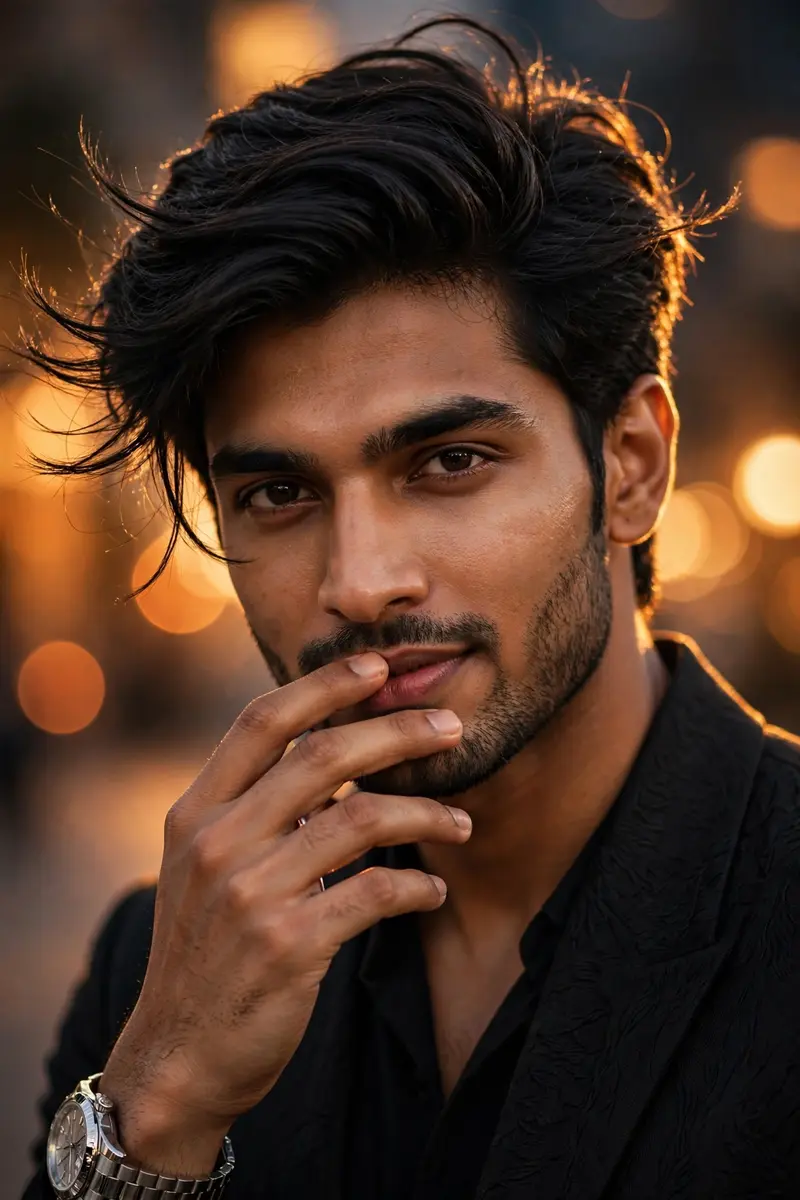
Best Close-Up Black Shirt Portrait Prompt AI Prompt
Copy the ready-made prompt below and paste it into ChatGPT, Gemini, or your favorite AI image generator to create a stunning photoreal portraits style image in seconds. No sign-up needed — just copy, paste, and generate.
⋈ AI PROMPT
Ultra-realistic cinematic DSLR portrait of a handsome young Indian man wearing a premium black fitted shirt with a subtle luxury texture, close-up chest-up composition, eye-level camera angle, head slightly turned around 25 degrees toward the camera, direct eye contact with the lens, confident subtle smile, right hand gently touching the chin or partially covering the lips with relaxed fingers, natural masculine pose, thick stylish black hair with soft volume, textured side-part hairstyle, a few loose strands naturally moving due to a gentle breeze, sharp jawline, clear glowing skin with realistic pores, expressive dark brown eyes, well-groomed eyebrows, clean-shaven or neatly trimmed beard, luxury silver wristwatch on the left wrist, minimal ring on the right hand, soft warm golden-hour rim light outlining the hair, rich orange cinematic bokeh lights in the background, shallow depth of field, creamy background blur, elegant luxury evening atmosphere, premium editorial fashion photography, ultra-detailed skin texture, realistic lighting, HDR, 85mm lens, f/1.8, Canon EOS R5, natural color grading, 8K ultra-HD, photorealistic, highly detailed, masterpiece, no text, no watermark.
How to Use This Prompt with ChatGPT & Gemini
Click the Copy button above, then open ChatGPT (with image generation) or Gemini. Paste the prompt, hit generate, and wait a few seconds. You can tweak any detail — colors, lighting, mood — to make it your own.
How to Keep Your Face Unchanged
Want your own face in this style? First generate the base image with the prompt above, then use a face-swap tool like InsightFace or the Remini app to place your face onto the result.



