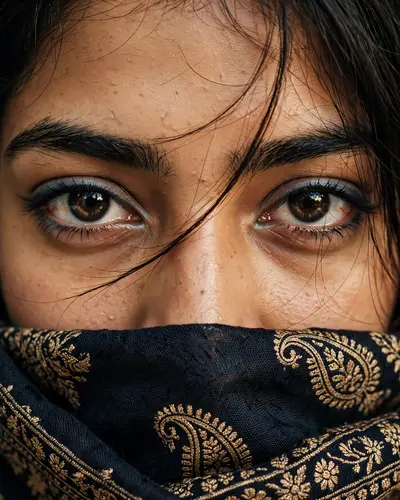
Create an ultra-realistic close-up portrait photograph of a young South Asian woman, framed extremely tightly around her eyes, eyebrows, upper nose, forehead, and partially covered lower face. COMPOSITION: Extreme close-up portrait, face filling almost the entire frame. The camera is positioned directly in front of her face at approximately eye level. Both eyes are clearly visible and centered horizontally. Only the upper portion of the face is exposed while the lower half is naturally covered by a dark traditional patterned dupatta/scarf. The framing should feel like a candid smartphone portrait captured very close to the subject. FACE & EXPRESSION: Natural youthful South Asian facial features, realistic skin texture, soft forehead, naturally shaped thick dark eyebrows, large expressive dark-brown eyes looking directly into the camera. Eyes should be the main focal point. Subtle natural under-eye texture and slight redness around the inner corners of the eyes. No exaggerated expression, calm and slightly mysterious gaze. EYES & MAKEUP: Dark brown realistic irises with detailed natural reflections and visible catchlights. Thick black eyelashes with subtle mascara. Soft blue/grey eyeliner or eyeshadow tracing the upper eyelids, slightly winged toward the outer corners. Very subtle shimmer around the inner eye area. Natural lower eyelashes clearly visible. Makeup should look realistic and slightly imperfect rather than digitally polished. HAIR: Long dark brown/black hair, naturally straight with a slight soft texture. Hair falls from the upper-right side of the frame toward the forehead and temple. Several extremely fine loose strands of hair cross naturally over the forehead, eyes, and bridge of the nose. Preserve realistic individual hair strands. SKIN: Warm medium-light South Asian skin tone with realistic pores, fine skin texture, subtle natural imperfections, soft peach undertones, and gentle highlights on the forehead and nose. Absolutely no plastic skin, excessive smoothing, artificial beauty filter, or over-retouching. CLOTHING: The lower half of the face is covered by a traditional dark navy/black dupatta or scarf with an intricate antique-gold paisley and floral embroidered pattern. The fabric should appear rich, slightly textured and woven, with detailed golden motifs and borders. The dupatta is held naturally close to the face and occupies the lower portion of the image. LIGHTING: Warm indoor lighting, soft but slightly direct illumination on the face. A subtle warm flash-like highlight creates bright realistic catchlights in both eyes and gentle highlights on the forehead and nose. Soft shadows around the eyes and fabric folds. Natural warm golden-brown color temperature. CAMERA: Shot on a high-quality smartphone or professional portrait camera, approximately 85mm equivalent portrait perspective, very shallow depth of field, sharp focus specifically on both eyes and eyelashes, realistic optical falloff toward the surrounding areas. Natural photographic depth, no artificial CGI appearance. COLOR GRADING: Warm cinematic tones, slightly muted contrast, rich dark blacks, subtle golden highlights, natural skin tones, deep navy fabric, antique gold embroidery. Slight vintage/film-like warmth while maintaining realistic skin colors. DETAIL: Photorealistic, highly detailed eyes, individual eyelashes, individual hair strands, realistic fabric weave, embroidery details, natural pores and skin texture, realistic reflections in the eyes, subtle lens softness, authentic smartphone photography aesthetic. STYLE: Ultra-realistic candid portrait photography, intimate close-up, natural beauty photography, cinematic realism, authentic South Asian aesthetic, subtle warm film photography look. ASPECT RATIO: 4:5 vertical portrait. NEGATIVE PROMPT: cartoon, anime, illustration, CGI, 3D render, plastic skin, airbrushed skin, excessive beauty filter, over-smoothed face, unrealistic eyes, extra eyes, distorted face, asymmetrical eyes, fake eyelashes, exaggerated makeup, oversaturated colors, excessive HDR, artificial lighting, blurry eyes, deformed facial features, duplicate facial features, unnatural hair, excessive bokeh, low resolution, watermark, text, Instagram interface, social media icons.