Aesthetic Photo Collage
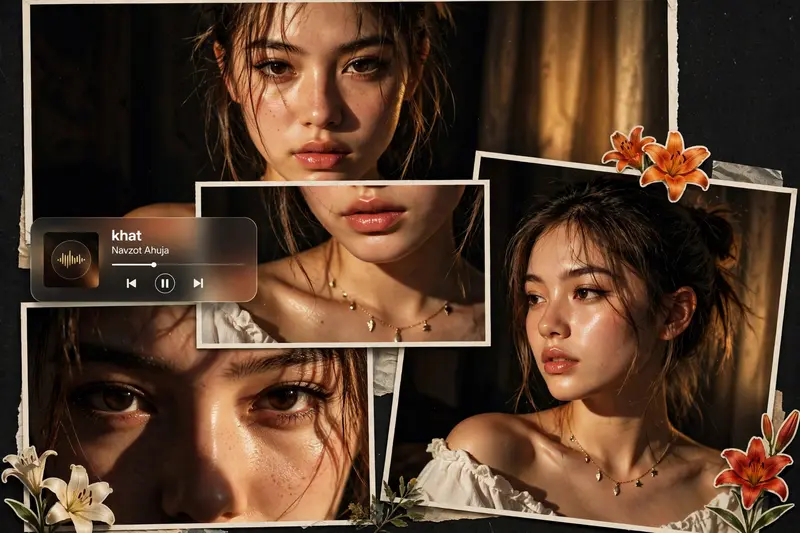
Best Aesthetic Photo Collage AI Prompt
Copy the ready-made prompt below and paste it into ChatGPT, Gemini, or your favorite AI image generator to create a stunning photoreal portraits style image in seconds. No sign-up needed — just copy, paste, and generate.
⋈ AI PROMPT
Ultra-realistic cinematic collage of a young woman using the uploaded face exactly 📸✨. The image is composed of multiple rectangular photo panels layered vertically and diagonally, creating a scrapbook-style layout 🖼️📔. Each panel shows close-up and mid-shot portraits of the same girl in a dim indoor room 🌙. Lighting: strong, warm, golden-orange direct flash lighting hitting the face from the front-left 💡, creating high contrast, deep shadows, and a glowing skin effect ✨. Background remains dark with visible window curtains slightly illuminated 🪟. Harsh highlights on cheekbones, nose, and lips. Slight film grain and soft blur for a dreamy vintage feel 🎞️. Color grading: intense amber, burnt orange, and golden tones dominating the entire image 🧡🟠. High saturation, slightly crushed blacks, and glowing highlights. Subject styling: messy tied-back hair with loose strands falling on face 💇♀️, glossy lips 💄, subtle eyeliner, dewy skin. Wearing a delicate necklace with small pendants and a casual off-shoulder white top 📿👚. Composition details Top panel: serious expression, looking directly at camera 👀. Middle panel: cropped lips and necklace close-up 💋. Bottom left: extreme close-up of eyes with strong shadow split across face 🌑. Bottom right: angled portrait with soft side gaze. Panels overlap slightly with uneven spacing for aesthetic collage look. Overlay elements: Add realistic flower stickers (lilies in orange, cream, and red tones) placed around the collage 🌷🌼. Add a music player Ul card in the center-left area with a soft rounded design 🎵. Music player text: Title: “khat" Artist: “Navzot Ahuja" Include minimal playback bar and icons (playlpause, skip). Final touches; Slight glow/bloom effect on highlights ✨. Subtle vignette around edges. Flash photography look, like taken on a digital camera at night 📷. Maintain natural skin texture, avoid over-smoothing.
How to Use This Prompt with ChatGPT & Gemini
Click the Copy button above, then open ChatGPT (with image generation) or Gemini. Paste the prompt, hit generate, and wait a few seconds. You can tweak any detail — colors, lighting, mood — to make it your own.
How to Keep Your Face Unchanged
Want your own face in this style? First generate the base image with the prompt above, then use a face-swap tool like InsightFace or the Remini app to place your face onto the result.
Try more variations in the prompt seen photo collection on PromptSeen.
![Transform this image [UPLOAD YOUR IMAGE] into a DSLR shot resolution of A ultra-hyperrealistic cinematic modern lifestyle photo collage featuring a](/wp-content/uploads/2026/10/thumbs/1985.webp)